This article presents Analysis / Implementation / Reflection, a simple pattern for resolving issues. While the core of this pattern, the implementation, is quite conventional, there are a couple of novel additions. In the analysis phase, the agent is used to explore the issue and create a suitable harness to evaluate the solution. While the reflection phase probes the agent to provide a qualitative assessment of the implementation. Together, these provide a high degree of confidence in the solution (both functional correctness and overall quality) and ensure that you, the developer, are comfortable with the solution and able to ‘own’ the outcome.
Establishing Project Baselines

Before diving into any issue, it is useful to establish project baselines via generating copilot instructions for your workspace. These help define coding standards, library preferences and architectural patterns before the agent attempts to make any adjustments to the codebase. These are included by default in every chat prompt, meaning it saves you the headache of including them yourself manually each time, or expecting the agent to infer these standards itself.
Take the time to review and adapt these appropriately, don’t rely on the AI to pick up everything. It can be particularly common to have unwritten rules and/or assumptions in a software project; this instructions file would be a great place to write any of those down.
Revisit the instructions file as you work together with agents in the codebase. Agents frequently need fine tuning and guidance to avoid common pitfalls such as stalling indefinitely when choosing to run tests in watch mode. As you build up these instructions you should start to see get a more reliable output first time when using agents.
Faster Issue Contextualisation
Getting up to speed on a new issue drains your daily cognitive bandwidth. Being able to shorten this isn’t just about saving time but also preserving your mental energy to use elsewhere.
Agents are a great tool for summarising what can be dense, comment-heavy issues - stripping away non-essential or irrelevant conversation. Try prompting your agent to distil issues into core requirements, blockers and current consensus allowing yourself to focus quicker on the technical challenge at hand.
Try not to limit yourself to textual based summarisations either, modern multimodal models can digest almost anything attached to a ticket. Screenshots, stack traces, database schemas and even video recordings of a bug can all be fed to the agent to build a robust context before you write a single line of code.
Analysis → Implementation → Reflection loop
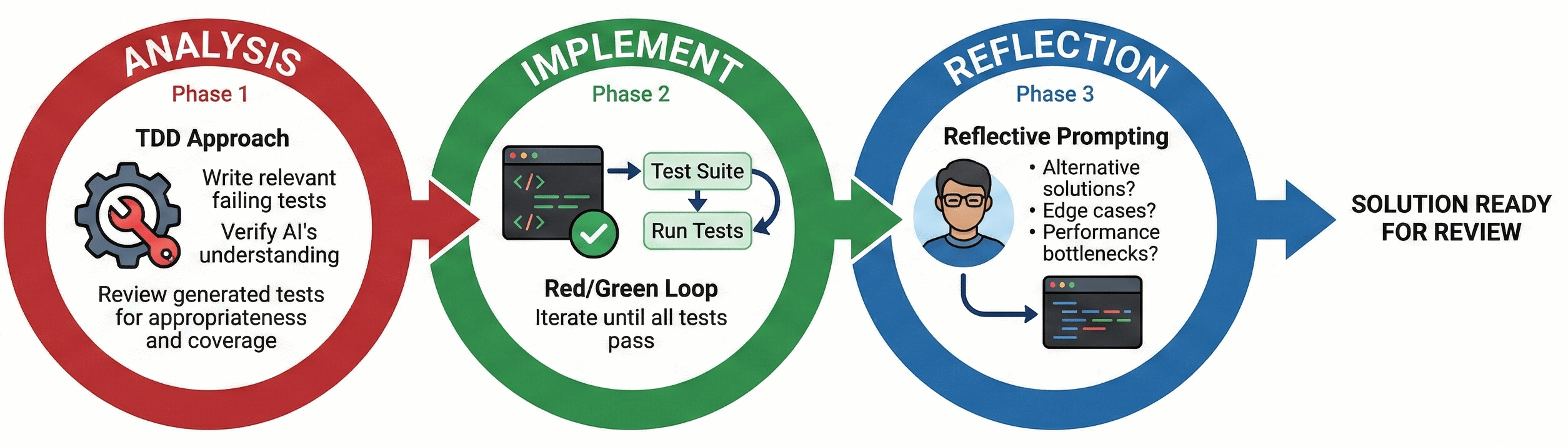
Closing the feedback loop, effectively allowing an agent to evaluate the quality of its own output, is especially important for AI augmented software development. With the right constraints (e.g. a tightly bounded problem and comprehensive tests) agents can port large codebases with relative ease and swiftness.
Scaling this approach down to individual issues is just as powerful. Breaking the work into three distinct phases gives the flexibility to interject whenever the agent starts to struggle or drift off course.
Analysis
Once you’ve understood the issue - ideally using the faster contextualisation techniques mentioned earlier - it’s time to build a lightweight harness to let the agent iterate in a feedback loop. A typical approach involves asking the agent to analyse the provided issue and, adopting a TDD approach, write relevant failing tests that reproduce the bug or define the new feature. Be warned: the agent may stumble even at this first hurdle, especially if the issue is difficult to reproduce (if at all).
Take a moment here to reflect. Are the generated tests appropriate, relevant and offer good coverage? Are there any potential gaps or missing edge cases? Your goal here is to verify that the AI agent fully understands the issue.
At this point you should have a decent idea in your head of a rough solution to the issue, giving you a solid point of comparison for the final reflection step.
Implementation
With failing tests in place, the implementation phase should drive itself. Prompt the agent to implement a solution and use the test suite as the primary feedback mechanism (the classic Red/Green loop). The trick here is to instruct the agent to iterate until all tests pass.
Example Prompt:
Now that we have failing tests, please implement the code required to resolve the issue. After your first attempt, automatically run the test suite. Use the test output as your primary feedback mechanism. If the tests fail, analyse the error, adjust your implementation, and run the tests again. Continue this Red/Green iteration loop until all tests pass. Crucially: Once all tests pass, stop immediately and await my review. Do not proceed to refactoring or further tasks.
Reflection
Arguably, this is the most important step of the loop, where you take on responsibility for the outlined solution. This involves using reflective prompting to challenge the agent’s outlined solution, particularly if it deviates from how you assumed the issue would be solved.
Typical lines of questioning include:
Architectural Integrity
-
What alternative solutions did you consider, why did you choose this one? Outlines other potential pathways to a solution that may be preferrable
-
What edge cases or unexpected inputs could cause this implementation to fail? Gets the model to look for cracks in their own logic
-
Are there any specific scenarios where this solution might introduce a race condition or state inconsistency? Useful for any asynchronous or multi-threaded work
Maintainability
- If a junior team member had to maintain this code in six months, what part would be the hardest for them to understand? Neat trick to force AI to identify complex and/or unreadable logic that may warrant refactoring or commenting
Security
-
Are there any hidden performance bottlenecks or scaling issues in this approach? Good catch-all for performance / inefficiency
-
What potential security implications or vulnerabilities does this change introduce? A mandatory sanity check, especially relevant if the solution handles user input or involves authentication
Making the model defend and justify its logic is a great way to uncover edge cases or simpler paths that were glossed over in the first pass. You may also find it useful switching to a completely different model at this point and ask it to run a blind code review on the newly implemented changes.
Managing the context window
Keeping an eye on your context window usage, particularly when you’re deep in a long running chat thread with an agent can save you from diminishing performance.
There are various levers you can pull to improve context efficiency. A major one to explore is the Model Context Protocol (MCP), which lets your AI tools fetch specific, bite-sized context from your local environment on demand, saving you from pasting in whole files and burning through your token limits.
Even with these tools, if context limits are a frequent problem, consider how you can break down larger pieces of work across multiple, isolated chats. Often, a bloated context window means you’re simply trying to solve too much at once within the agent’s current capabilities.
Debugging AI Chat
Agents have a big problem with explainability. Nobody can explain exactly how models work ‘under the hood’, and because we are using bleeding-edge tools, the harness layer itself will frequently break in unexpected ways.
However, you can give yourself a headstart by lifting the lid a little. Quite often, the misbehaviour isn’t a deep problem. It’s just bad input at the harness level. It’s worth digging down into that layer via chat debug view (equivalent tooling exists) which lets you see what context, prompts and tools were used when talking to an agent. This added transparency can help you course-correct effectively.