
Recently our sister company Marra built an agentic “teammate” for user onboarding using Microsoft Power Platform exploring new AI features available. They asked Scott Logic to do the same using Microsoft Agent Framework. Luckily I was on the small team who got involved.
The project was to ultimately compare the two teams’ experiences, find the advantages and challenges of each and to explore agentic technology. This post focuses on our work with Microsoft Agent Framework rather than comparison.
Our Task
We were tasked to build an agentic system for user onboarding with human-in-the-loop. Onboarded users should be saved on two downstream systems: HubSpot and LeavePlanner (SharePoint hosted Excel Workbook).
The objective was to communicate as you would with a “teammate”. This was a time-boxed exercise (three weeks to investigate, build, and present).
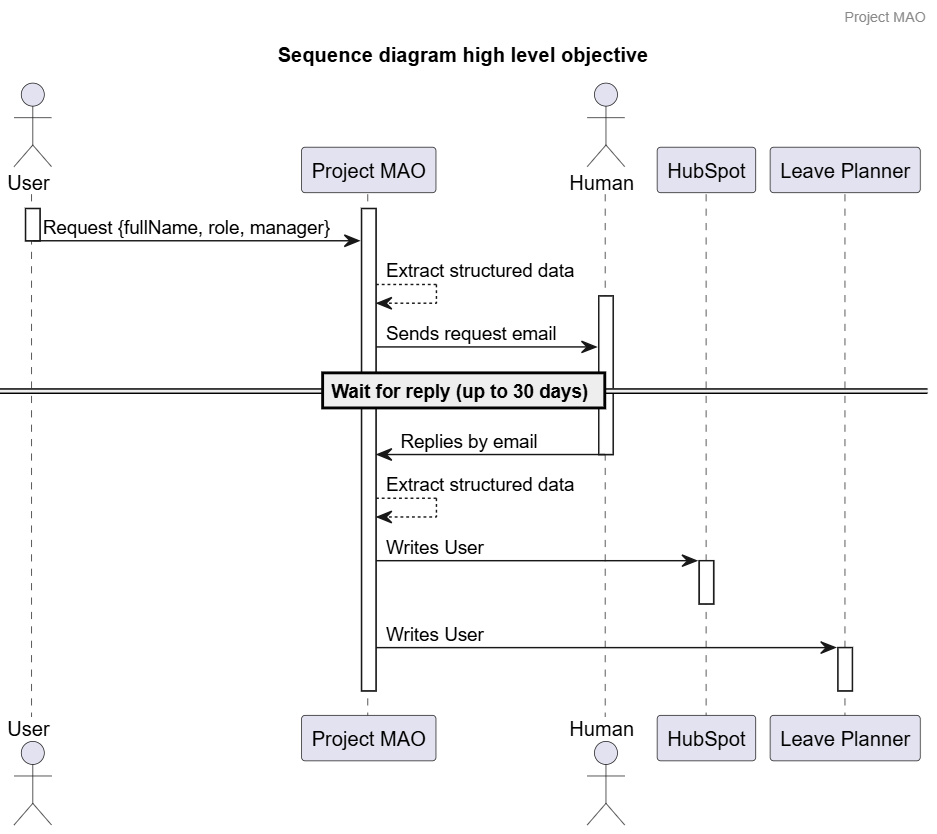
Our Build
Microsoft Agent Framework was up to the challenge. We built a single entry point minimal multi-agent solution. We hosted our agentic workflow in Azure as a container, not quite on Microsoft Foundry as we would have liked, but next time we might get there.
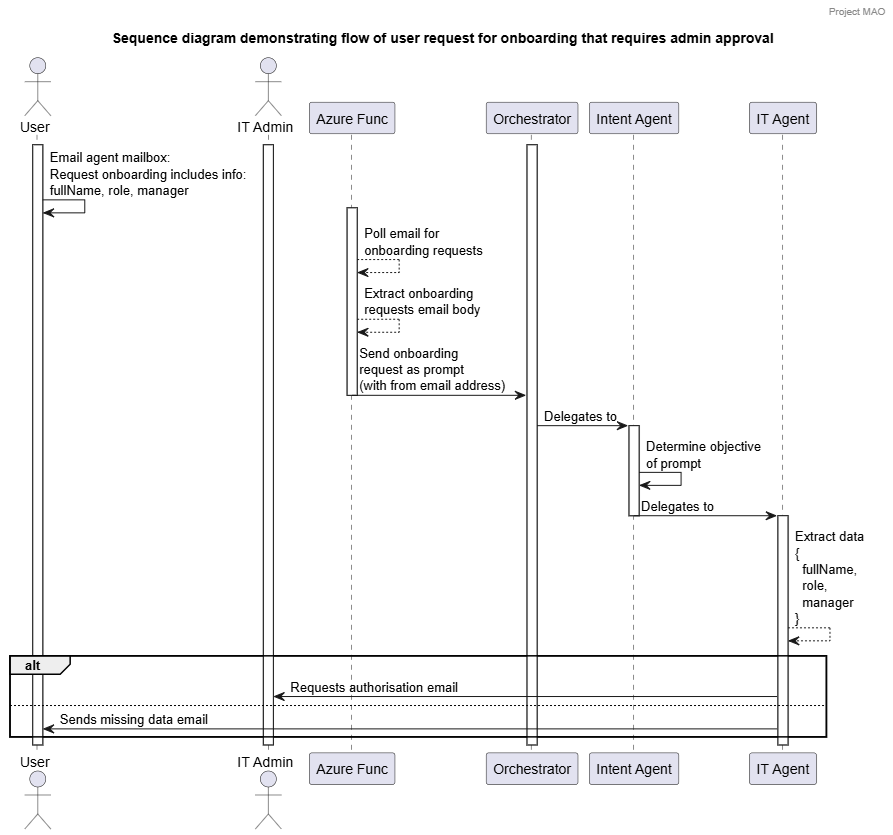
Our solution interaction was by email. We used an Azure Function to poll the “agent” mailbox, pick up relevant emails and extract the content to send to our agent. Our agent could also send email for communication, and perform the user onboarding tasks using custom tools.
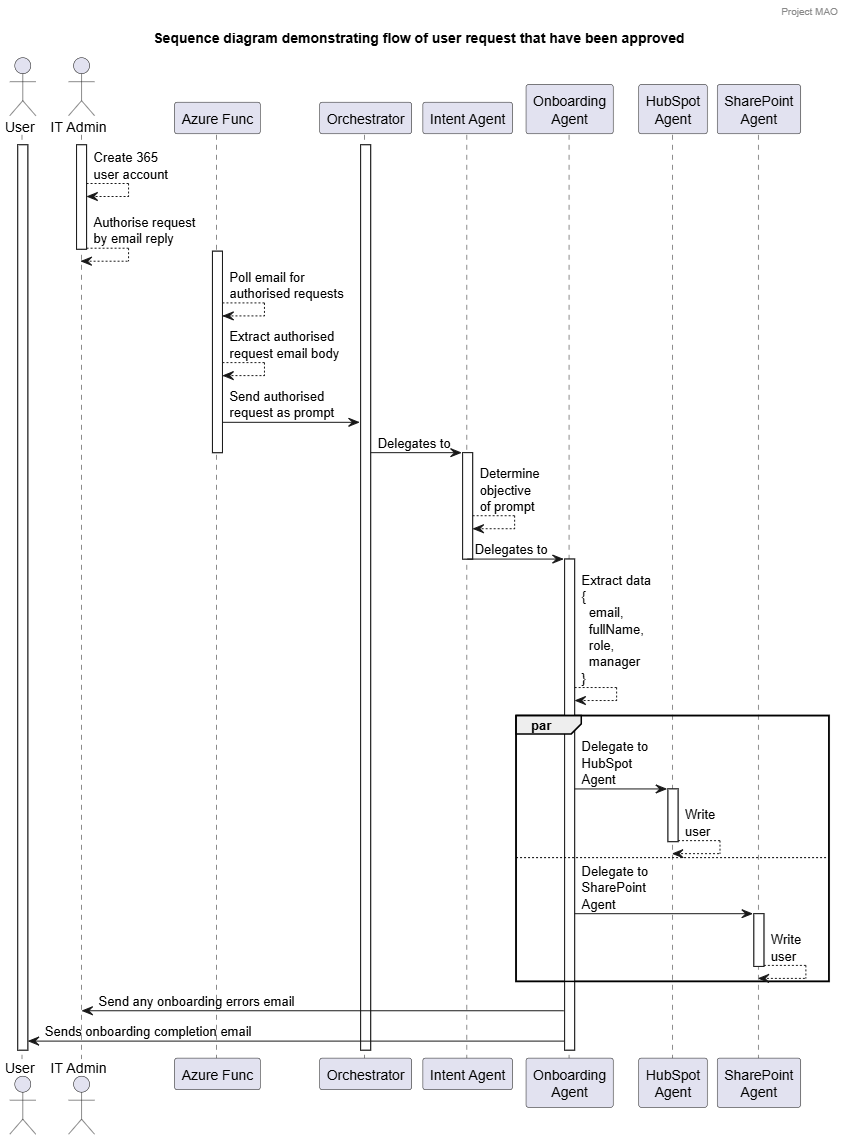
To understand what we’ve built I have a couple more sequence diagrams:
Disclaimer
A traditional system could have been written to do this without the use of an LLM. The exercise was to use an existing Microsoft based communication system as a teammate. The LLM gave us easy data extraction from free text in an email string, then tools enabled us to write custom actions we could expect the LLM to execute.
The solution discussed here was built entirely as an exploratory exercise proof of concept, we would have needed to do a fair amount of work for a production hardened system.
Our Journey
Our team brought relevant experience from previous LLM-powered projects and other agentic solutions.
On initial investigation, Microsoft Agent Framework was very interesting. We could quickly define a deterministic workflow and agents handing off to each other in a pretty modular way.
This gave us a quick start to get moving with code samples from the github repo and some documentation.
Microsoft Agent Framework
The Microsoft Agent Framework and Microsoft Foundry was our primary focus, this was relatively new and brought together previous frameworks Semantic Kernel and AutoGen.
We could have many small agents working together to perform a bigger task by handing off to each other. The advantage here with the small dedicated tasks meant we could keep the system and user prompts super short and to the point. The smaller context per agent gave us a much higher chance of getting exactly what we wanted from our LLM.
We quickly configured the Microsoft Foundry GPT-5 nano model and started planning our onboarding agent.
We implemented DevUI (included with Microsoft Agent Framework), it was a nice addition for quickly visualising our agentic workflow and testing as we built. Also very useful when demonstrating functionality to stakeholders, see screen grabs of workflows below.
Microsoft Agent Framework DevUI - Example of the approval steps:
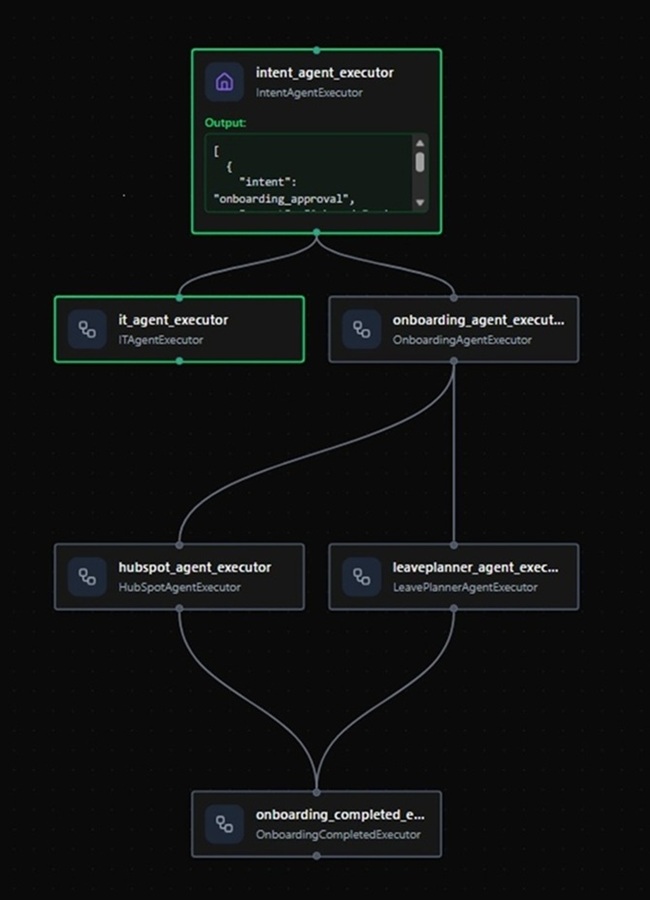
Microsoft Agent Framework DevUI - Example of the onboard steps:
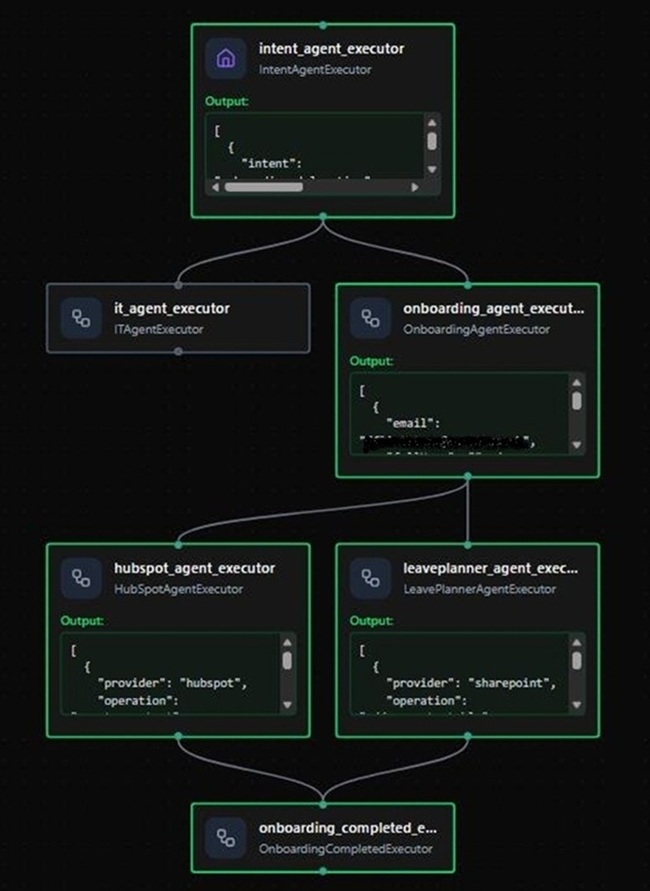
Teammate and Human in the loop
We needed to include our agent as a “teammate”, initial thoughts gave us email with GraphAPI (polling or subscription), Microsoft Teams, or even email Adaptive Cards for Outlook Actionable Message. After considerable team debate and research, we opted for Graph API with email polling due to its setup simplicity and faster configuration.
We opted to have the email polling done using an Azure Function and submit the body as prompts to the agent rather than have the agent read the mailbox directly. So the flow was that the user sent an email to their “teammate” and this was forwarded to the agent which could reply to email as necessary.
Then the human-in-the-loop point where the agent requested the 365 account creation before proceeding to onboard the user, gave us some security before accounts were simply created.
Our Agent Breakdown
Perhaps the most interesting part was what our agents actually did. We had various agents implementing different techniques and tools which lent themselves well to our scenario.
Intent Agent
Simply determine the intent of the request. Our scenario had two paths: a request from a user sent by email to go to IT for approval, or a request to go to the onboarding agent.
The agent figured this out based on its system prompt (a short instruction and a few brief examples) and the email request body, the email body was a simple sentence, not CSV content or any specific format we wanted the user to remember. Next step was then delegate to either the IT Agent or the Onboarding Agent.
We sent the actual request to the agent using an Azure Function that extracted the email body text. This could have been done by the agent and was likely something we would have investigated given extra time.
Future growth here is pretty big as we could add many more scenarios that the agent handles, change job role, remove user etc - if it gets too much then simply plug in a couple of other agents as necessary.
IT Agent
This agent handed the request off to a human. The onboarding flow required that the 365 user account was created by a human, so a request for IT to do this would be sent by email. This enabled the human operator to interact with the agent by replying to the email with the new users 365 email address.
The IT Agent performed entity extraction to get the user’s name, job role and line manager.
The IT Agent had a custom send email tool (using Microsoft Graph API - authenticated with Entra ID). The tool sent an email request for onboarding to the human administrator to complete the request. Alternatively, if the entity extraction determined data was missing, an explanation was sent to the user.
Onboarding Agent
This was the second time around. The administrator had now created a new business user account and provided the 365 email/username to our Intent Agent. The admin had replied to the email (which the Azure Function was sending back to the agent). This time the Intent Agent had determined this and handed over to the Onboarding Agent.
The Onboarding Agent ran entity extraction. Then given success on email, the user’s name, job role and line manager, started onboarding.
Here we handed off to multiple agents at once: HubSpot agent and SharePoint (Leave Planner shared Excel workbook).
Future growth here might be that the user administrator could decide to exclude some systems to onboard to or have different systems based on user role.
HubSpot Agent
Our first external system to onboard the user, simply call the API to create the user. To do this we built a custom tool for the operation that we provided to the agent.
Our tool had some logic for error handling but we’d see future growth where the agent could have more functionality. Search, update and delete (securely, of course) tools could be available in a more production hardened solution.
The end result then continued to the Completion Agent.
SharePoint Agent
The task here was simple, insert a record for the new user in the fictional LeavePlanner holiday system, which was represented by an Excel workbook on SharePoint. The agent had a single tool to insert the row in the workbook.
Of course, this could get considerably more complicated and could offer more tools such as update, delete and select.
The end result then continued to the Completion Agent.
Completion Agent
Here we wanted to see green on DevUI when using example prompts. This was less of an agent and more a point to connect the workflow back to a resolution. Check the results from inbound agents, send success emails to systems the user had been onboarded to, and report any issues encountered to the IT department.
Outcomes
Overall this was a fast-moving, interesting project, providing a better understanding of where agentic systems add value and the parts of an agentic approach. I’ve reflected on a previous LLM powered systems I worked on, and how dedicated agents could give a more robust solution than a large single prompt.
Microsoft Agent Framework is definitely going to be a point of interest in any upcoming LLM-powered solutions our team build.
As for the email a “teammate” interaction we investigated. Do people want to communicate with an AI-powered “teammate” rather than having another system to use that submits requests through a traditional form. I can definitely see this being preferable is various situations.
Then do I want an agentic “teammate” to do things I have to do as part of life that I consider boring - yes. I already do, daily I’m using copilot to make work quicker and easier.