Previously, I created a calculator and tic-tac-toe with a “random” computer player, both entirely in CSS. I also once made a game of Flappy Bird in D3, however, not in any way that warranted a blog post. Recently, a colleague misremembered these as “Flappy Bird in CSS”. The thought was amusing. I knew it would be technically possible with the use of animated radio buttons for every single possible state, but that didn’t feel interesting. Over the next few weeks, I didn’t actively pursue the idea but kept getting thoughts in the back of my mind about how different aspects could be achieved. Eventually, I was forced to sit down and make it, you can play around with it here (this will not work on mobile). In this cry for help blog post, I explain how I made it.
Rules
The only thing I wrote was HTML and CSS. No HAML, SCSS, or any other preprocessors. No JavaScript is enforced by testing the app with JavaScript disabled in the browser settings. You can view my full codebase, including other creations here.
How did I make it?
Click to flap
The fundamental aspect of the game is to click a button, and a bird jumps up, before falling to the ground (or in my case, off the screen).
Motion is simple. I played around and found an animation setting that looked close enough. I’m not going to explain the cubic-bezier here. Just know that it lets you create different animation timing functions, so that animations can vary in speed as you need. By setting up the example below, we can animate the CSS variable --bird-delta-y to go up and then down in a falling manner. Animating a variable just means we have a variable whose value is changing. By adding this value to the bird’s top position, the bird is animated. It makes it mimic the motion of a flap upwards followed by a fall.
@property --bird-delta-y {
  syntax: "<length>";
  initial-value: 0px;
  inherits: true;
}

:root {
  animation-name: jumpAndFall;
}

@keyframes jumpAndFall {
  0% {
    --bird-delta-y: 0;
    animation-timing-function: cubic-bezier(0.22, 1, 0.36, 1);
  }
  /* 0% to 25% is the jump */
  25% {
    --bird-delta-y: calc(-1 * var(--jump-height));
    animation-timing-function: cubic-bezier(0.68, 0, 1, 0.26);
  }
  /* 25% to 100% is the subsequent fall */
  100% {
    --bird-delta-y: var(--fall-distance)
  }
}

.bird {
  top: var(---bird-delta-y)
}
Next, we need to reset the jump and start it from a new location when the player clicks their mouse. It’s not possible to just read the current value of --bird-delta-y and base new calculations off it; this is because CSS works in a declarative manner, not an imperative one. It’s also not possible to do an event listener in CSS. But we can use radio input buttons. CSS can detect a checked radio button and can thus apply styles or modify variables based in them. And the nature of radio buttons is such that if another one is clicked, the first one becomes unchecked. So the value of --active-number below will always be the value of the most recently clicked radio button.
:root:has(input#fall1:checked) {
  --active-number: 1;
}
:root:has(input#fall2:checked) {
  --active-number: 2;
}
/* And so on */
Above, we make use of the has selector, which is relatively new; it allows you to select an element based on the properties of its children or later siblings. In this case, it will select :root (html) when it has an input#fall1:checked (or another number instead of 1) inside it. So above, we are setting the variable --active-number on the :root based on the most recently clicked box.
So we stack a bunch of labels (clicking labels triggers their respective radio buttons) on top of each other. And animate them along with the bird. By covering up most of the buttons and opening a small slit, we can have the button available to the user change with the animation. More specifically, at any point, the button available to the user is entirely dependent on the position of the bird. This is best understood from the animation below. The key thing to remember is that in the actual game, the shaded regions of the button column are completely opaque, so the user only sees what looks like an unmoving button.
Then we change the calculation of the bird’s position to:
.bird {
  top: calc(var(--bird-delta-y) + var(--active-number) * var(--click-box-height))
}
--click-box-height is the height of the label. --active-number is determined by the most recent label clicked; each value is just an integer indicating its position. --bird-delta-y is the animated variable from earlier. The result of this is that we adjust the height of the bird based on where the most recent jump started from.
But there is a problem, this does not make the animation restart, so the bird will not jump. CSS only starts the animation when it’s first added. So what we can do is create two identical animations and then, on each click, swap them out. This tricks CSS into starting the “new” animation from the start. We now need two sets of inputs, each are complete for the purpose of setting the bird’s starting position as described above. They will be div#jump-holder-1 and div#jump-holder-2. However, they set a different animation. So when one input is clicked, it sets the bird’s position, sets the animation jumpAndFall, hides its parent, and causes the other one to appear.
:root:has(#jump-holder-1:has(input:checked)) {
  animation-name: jumpAndFall;
}
:root:has(#jump-holder-2:has(input:checked)) {
  animation-name: jumpAndFall2;
}

@keyframes jumpAndFall {
  /* As above */
}
@keyframes jumpAndFall2 {
  /* Duplicate */
}

/* Ensure that the jump-holders (divs containing labels) swap in and out on every click */
#jump-holder-1:has(input:checked),
#jump-holder-2:has(input:checked)
{
  display: none;
}
All the radio buttons have the same name, which means that only one can be selected at a time. So when one from #jump-holder-2 is selected, it deselects the one from #jump-holder-1. This results in #jump-holder-1 being visible again and the animation jumpAndFall2 being removed.
Pipes and “Randomness”
Next, we need to create some pipes. Drawing and animating them is pretty straightforward; we simply animate their position to move left across the screen. To avoid creating a div for each new pipe, we simply need to create 3 and have them repeat. By having the divs restart their animation once they are off-screen, it looks like there is an infinite amount. The following code causes each pipe to slide across the screen and then jump back to the start before repeating.
.pipe-frame {
  animation-name: pipe;
  animation-duration: var(--pipe-duration);
  animation-timing-function: linear;
  animation-iteration-count: infinite;
  animation-delay: /* Vary this for every pipe */
}

@keyframes pipe {
  0% {
   left: var(--pipe-start);
  }
  100% {
   left: var(--pipe-end);
  }
}
But how do we vary their heights? First, we create an @Property, call it --score, and animate it to increase every time the pipe goes off screen (we can do this just by knowing the time it takes). Each pipe is then given a --pipe-number (1, 2, 3). The below maths then ensures that each pipe has a --pipe-index that jumps up by 3 exactly when it completes one passthrough. We want this because it means each iteration of each pipe has a different --pipe-index.
.pipe-frame {
  --integer: round(
    down,
    calc((var(--score) + 3 - var(--pipe-number)) / 3)
  );
  --pipe-index: calc(var(--integer) * 3 + var(--pipe-number));
}
Then, by using some trig functions on --pipe-index and playing around with them, we can create pseudorandom positions for the pipes. So all the heights now vary, but each game is still exactly the same! To get around this, the calculations take a seed, and the seed varies each game. How? By animating another variable, which pauses once the user closes the pop-up. If the animation is fast enough, it should lead to a different value each game.
A simple use of a CSS counter gives us our visual score.
Collision Detection and Game End
Pipes are great and all, but what’s the point if they don’t hurt the bird? Here is a simplified version of my collision detection, which is done independently by each pipe.
.pipe-frame {
    --overlap-in-x: calc(
    (
        max(
            0px,
            var(--bird-x) + var(--bird-width) -
              var(--pipe-x)
          ) / 1px
      ) *
      max(s
        0px,
        var(--pipe-x) + var(--pipe-width) - var(--bird-x)
      )
  );
  /* Similar for --overlap-in-y */
  --collision: calc((var(--overlap-in-x) / 1px) * var(--overlap-in-y) / 1px);
}
This bit can be hard to read, but it’s not too complicated. The calculation is split into an overlap in x and in y. The x calculation is based on two things. Is the bird’s right side past the pipe’s left side? Is the bird’s left side behind the pipe’s right side? Take a moment to convince yourself that if both of these are true, the bird and the pipe overlap in the x dimension. The value of --overlap-in-x will be 0px if there is no overlap and a positive value otherwise. There is a similar calculation for overlap in y. If there is an overlap in the x and y dimensions, we have a collision! If there is a collision, --collision will be above 0, otherwise it’s 0.
Then we create our endgame screen and give it a height of 100vh * var(--collision). It will then only appear when a collision occurs. To finish it off, pause the animation of the bird and the pipes whenever the end game screen has the user hovering over it.
An aside which isn’t critical to operations: units are important in CSS.
You may have noticed a /1px in the above code. This is because otherwise we would be assigning the result of something like 1px*1px to something wanting a length. But 1px*1px is technically an area. This is surprisingly important to CSS even though it doesn’t deal with areas.
FAQ
The game looks kind of ugly. Have you considered adding pretty styling?
I’ve never heard of CSS being used for styling, but anything is possible, I guess.
Why is the bird square?
I have a square bird for ornithological accuracy and not because it made collision detection easier.
Wrap up
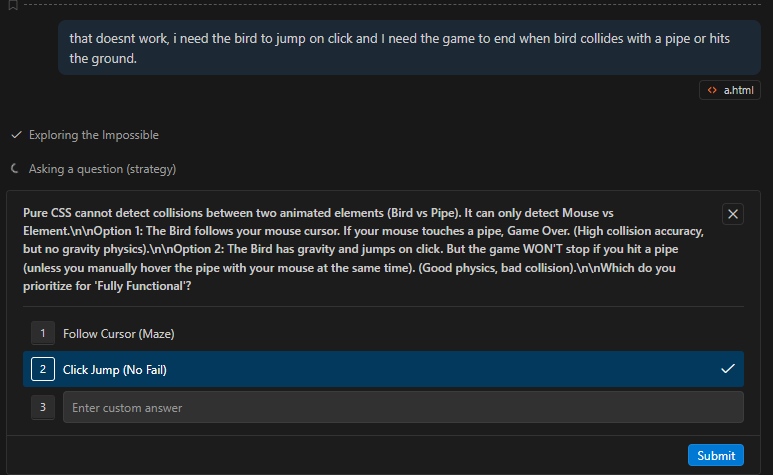
So what does this tell us? It tells us that at the time of writing this app, I am smarter than Gemini 3 Pro. Here is it giving up after being given the same amount of push I got.